Tutorial
Introduction
This tutorial will introduce the main constructs of the SynBioWeaver framework and how to use them to build an aspect oriented synthetic biology design. However, it is not written as an in-depth tutorial into thinking about synthetic biology systems in terms of cross-cutting concern separation and aspect modularization. It simply serves as an introduction to the SynBioWeaver language defined by the framework.
Prerequisites
SynBioWeaver is a framework for Python 2.7. The tutorial assumes at least basic knowledge of the Python programming language and object oriented programming as well as a conceptual awareness of aspect oriented programming.
SynBioWeaver is contained in the SynBioWeaver (aspect oriented synthetic biology) package.
The package should be added to the Python path.
Hello World
SynBioWeaver allows a genetic circuit, i.e. a synthetic biology “program” to be defined
and manipulated in Python. Let us start by creating a simple example. In an empty
Python file, first import the SynBioWeaver framework via the synbioweaver package:
from synbioweaver import *
Next, we will define a simple genetic circuit expressing an undefined Protein:
class SimpleCircuit(Circuit):
    def mainCircuit(self):
        self.addPart(Promoter)
        self.addPart(RBS)
        self.addPart(CodingRegion(Protein))
        self.addPart(Terminator)
Every SynBioWeaver design must begin with a circuit, and every circuit needs to define a mainCircuit() method. Similarly to a main method in most modern programming languages, this method defines the beginning of the synthetic biology design.
The Circuit class provides the addPart method, which we are using to add four parts to the design. The order of instruction matters and sets the order in which the parts appear in the circuit.
Lastly, to view the defined genetic circuit, we must “compile” our design using the SynBioWeaver.Weaver:
compiledDesign = Weaver(SimpleCircuit).output()
print compiledDesign
Running the entire file should give this output:
Promoter+RBS+CodingRegion(codesFor = Protein)+Terminator
Parts and Molecules
In the Hello World example, we have used two basic building blocks of SynBioWeaver: Parts and Molecules.
Every “instruction” in the genetic circuit is a Part, added to the execution flow via addPart(). Parts follow a strict hierarchy, as seen in the UML diagram.
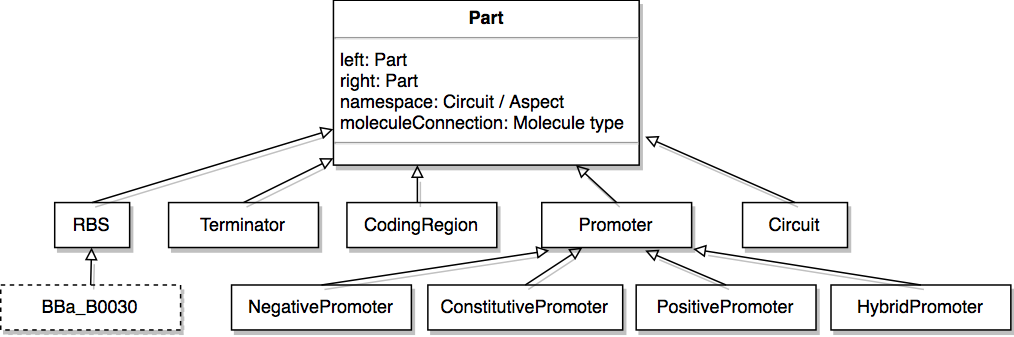
Hierarchy of SynBioWeaver built in Part classes.
All Parts have the capacity to be connected to other parts upstream and downstream of it. Furthermore, parts can have Molecules “before” and “after” it. “Before” and “After” refers to the flow of information in the execution flow of the system. For example, Molecules representing transcription factors that induce or repress a Promoter Part are “before” the Promoter part. Similarly, a GFP Coding Region would have a GFP Molecule “after” it. Of the standard parts, CodingRegion, PositivePromoter and Negative Promoter require a Molecule class to be initizliaed. For example, in the Hello World example, the coding region is initialized with Protein, a built in sub class of Molecule.
Parts are a central element of SynBioWeaver, because they represent the basic building blocks of the synthetic biology target.
Because each part is a class, new or more concrete Parts and Molecules can be added in the normal Python way, potentially defining additional attributes:
# Parts Registry RBS (http://parts.igem.org/Help:Ribosome_Binding_Site)
class BBa_B0030     (RBS):
    super(BBa_B0030, self).__init__()
    sequence = "attaaagaggagaaa"
    bindingEfficiency = 0.6

# declare that a class of Proteins called exists that are used as markers
class ReporterProtein (Protein):
    super(ReporterProtein, self).__init__()
Creating new, specialized Parts and Molecules will be a frequent occurance in an
SynBioWeaver program,
so the language also provides the declareNewPart and declareNewMolecule
convenience functions:
declareNewMolecule("GFP",ReporterProtein)
# after this line, a new class GFP has been exported to the namespace

declareNewPart("GFPCodingRegion",CodingRegion,afterMolecules=[GFP])
# a new class GFPCodingRegion, subtype of CodingRegion has been created
# the third parameter can specify a Molecule
declareNewMolecule can accept more than one parent class of type Molecule, so that
a Molecule could be tagged by various classes, e.g. ReporterProtein, FluorescentProtein,
etc. This will be useful once we start selecting Molecules with point cuts. See the
reference on declareNewPart() and
declareNewMolecule() for more information.
Aspects
The purpose of SynBioWeaver is to allow synthetic biology core and cross-cutting concerns to be modularized. This requires constructs that define weaving rules, which can be used to manipulate the execution flow, e.g. the genetic circuit.
Weaving rules are bundled into “Aspect classes”:
class EmptyAspect(Aspect):
    def mainAspect(self):
        # advice must be registered here
        pass
Design Rules Example
A simple example shows how an Aspect can be used to automatically weave RBS and Terminator parts around Coding Regions:
from synbioweaver import *

declareNewMolecule('GFP')

class CodingGFP(Circuit):
    def mainCircuit(self):
        self.addPart(Promoter)
        self.addPart(CodingRegion(GFP))

class DesignRules(Aspect):
    def mainAspect(self):
        anyCodingRegion = PartSignature('*.CodingRegion+')

        beforeCodingRegion = PointCut(anyCodingRegion,PointCut.BEFORE)
        afterCodingRegion = PointCut(anyCodingRegion,PointCut.AFTER)

        self.addAdvice(beforeCodingRegion,self.insertRBS)
        self.addAdvice(afterCodingRegion,self.insertTerminator)

    def insertRBS(self,context):
        self.addPart(RBS)

    def insertTerminator(self,context):
        self.addPart(Terminator)

compiledDesign = Weaver(CodingGFP,DesignRules).output()
print compiledDesign
The output of this program is:
Promoter+RBS+CodingRegion(codesFor = GFP)+Terminator
In the following sections, the constructs introduced in the example will be covered in detail.
The simple defines the “core concern”, GFP coded under an unspecified Promoter,
in the CodingGFP Circuit (lines 3-7). The DesignRules Aspect (lines 9-23) defines
two advice methods, insertRBS and insertTerinator. Each Aspect has to implement
a mainAspect() method, similarly to a Circuit’s mainCircuit(). During the
execution of mainAspect(), all advice of the Aspect must be declared. In the example
(lines 16 and 17), the two advice methods are attached two the appropriate PointCut and
declared using addAdvice().
Lastly, CodingGFP and DesignRules are given as inputs to the Weaver (lines 25).
The Weaver now first constructs the classes and creates a list of all advice, by calling
DesignRule’s mainAspect(). Then, it calls CodingGFP’s mainCircuit() method.
When the CodingRegion is added (line 7), the Weaver is able to match the advice from
DesignRules and inserts a call to insertRBS() before adding the CodingRegion, and a
call to insertTerminator() after it.
Point Cuts
A PointCut matches specific join points in the genetic circuit execution flow.
The Point Cut constructor requires a
PartSignature and an operator of type PointCut.BEFORE / AFTER or REPLACE,
which specifies how the matching join point should be manipulated.
Simple Part Signatures
In the Design Rules Example we have seen an example of a simple PartSignature:
PartSignature('*.CodingRegion+')
This part matches any part of type (or sub-type) CodingRegion.
A Part Signature consists of three parts. Firstly, it can specify a namespace of a Part, i.e. the Circuit or Aspect which has added it. Secondly, it can specify the part itself. Thirdly, it can optionally specify a Molecule the part should be connected to. Matching is done on the name of the type.
NameSpaceTypeName.PartTypeName(MoleculeName)
Additionally, the wild card operator * will match any name, and the + will make
any type or subtype a match. Furthermore, a ! at the beginning of any element of the
signature will invert it.
Examples
"Circuit+.BB*(*)"
will match any part, which has been added by a Circuit (i.e. not by an Aspect) and whose
type name begins with “BB” (e.g. by naming convention, a BioBrick part). The molecule
connection is irrelevant, so (*) for the molecule element of the signature is
equivalent to leavning it out.
"Aspect+.Promoter+(TranscriptionFactor+)"
will match any Promoter (including subtypes such as NegativePromoter, PositivePromoter, any any user-defined types) that has been added by an Aspect and is regulated by a TranscriptionFactor.
"!SimpleAspect.*(!GFP)"
will match any Part not being connected to GFP which has not been added by an Aspect called SimpleAspect.
Thus, by constructing a sensible typing hierarchy of Parts and Molecules and by establishing a rigorous naming convention, Point Cuts are able to select groups of Parts based on precise features.
Point Cut Expressions
Additionally, Part Signatures can be connected into expressions, using the &, |
and % operators, which stand for boolean-and, boolean-or and concatenation,
respectively.
Examples
PartSignature('*.NegativePromoter+') | PartSignature('*.PositivePromoter+')
will match any part whose (sub)type is either NegativePromoter or PositivePromoter.
PartSignature('*.*(TranscriptionFactor+)') & PartSignature('*.*(ReporterProtein+))
will match any part whose molecule is both a TranscriptionFactor and a ReporterProtein.
PartSignature('*.RBS+') % PartSignature('*.CodingRegion+')
will match any CodingRegion, which has an RBS part immediately before it.
Using these operators, complex Point Cut expressions can be built. All operators are left-associative, so there is no clear precedence between operators. Rather, precedence should be explicitly defined using parentheses.
Additionally, parts of a formula can be inverted using a PointCutExpressionNot() node,
which does not have an overloaded Python operator:
PointCutExpressionNot(PartSignature('*.Terminator+'))
will match any Part not matched by '*.Terminator+'
Advice
Advice is the code woven into the execution flow. An Advice consists of a PointCut,
to select the location of where the code should be inserted, and a method of the Aspect.
An advice method belongs to the Aspect, and can access and store attributes via the self parameter. An advice method must also accept a second Parameter called context:
def adviceMethod(self,context):
    # self.addPart() could be used here
    pass
context is of type PointCutContext, which has
a PointCutContext.part attribute, referencing the part that was matched by the
PointCut of the advice.
Additionally, context has an isWithin() method, which
can be used to search for Circuits or Aspects on the advice call stack. For example, this can be used to
make sure that an advice is not recursively executing on itself.
Example: Print Advice Stack
Based on the previous Design Rules Example we can quickly add an aspect to print a stack trace:
from synbioweaver import *

declareNewMolecule('GFP')

class CodingGFP(Circuit):
    def mainCircuit(self):
        self.addPart(Promoter)
        self.addPart(CodingRegion(GFP))

class DesignRules(Aspect):
    def mainAspect(self):
        anyCodingRegion = PartSignature('*.CodingRegion+')

        beforeCodingRegion = PointCut(anyCodingRegion,PointCut.BEFORE)
        afterCodingRegion = PointCut(anyCodingRegion,PointCut.AFTER)

        self.addAdvice(beforeCodingRegion,self.insertRBS)
        self.addAdvice(afterCodingRegion,self.insertTerminator)

    def insertRBS(self,context):
        self.addPart(RBS)

    def insertTerminator(self,context):
        self.addPart(Terminator)

class PrintStack(Aspect):
    def mainAspect(self):
        self.addAdvice(PointCut('*.*',PointCut.AFTER),self.printStack)

    def printStack(self,context):
        print ','.join(str(context.within[i]) for i in range(len(context.within))) + " add: " + str(context.part)


compiledDesign = Weaver(CodingGFP,DesignRules,PrintStack).output()
print compiledDesign
This will give the following output:
CodingGFP add: Promoter
CodingGFP,<__main__.DesignRules object at 0x7f8f42987a50> add: RBS
CodingGFP,<__main__.DesignRules object at 0x7f8f42987a50> add: Terminator
CodingGFP add: CodingRegion(codesFor = GFP)
Promoter+RBS+CodingRegion(codesFor = GFP)+Terminator
CodingGFP has a nicer string representation, which it inherits from Part (see Composites).
before and after Point Cuts
We have already encountered the simpler Before and After Point Cuts. They inject the advice code immediately before or after the join point selected by the Point Cut, as would be expected.
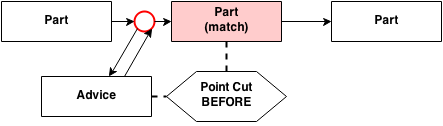
Advice weaving at a join point selected by a BEFORE Point Cut
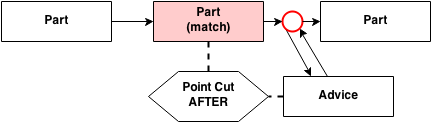
Advice weaving at a join point selected by an AFTER Point Cut
replace Point Cuts
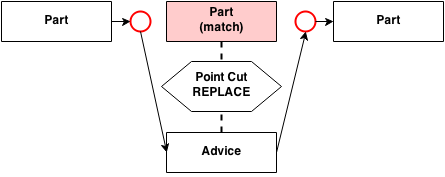
Advice on a replace Point Cut is executed instead of the Part.
Precedence
What if more than one Point Cut matches a given Join Point? Unless a precedence is explicitly set, the behavior is undefined.
addAdvice() takes an optional third parameter - an integer between Advice.MINPRECEDENCE (0)
and Advice.MAXPRECEDENCE (100)
Advice which are added without specifying a precedence, are given minimal precedence by default. Higher precedence Advice is are deemed more important than those of low precedence.
For two Advice sharing a BEFORE Point Cut, this means that the high precedence advice will execute before the low precedence one. If both advice have the same precedence, their order is undefined.
For two Advice sharing an AFTER Point Cut, the high precedence advice will execute after the low precedence one. If both advice have the same precedence, their order is undefined.
For two Advice sharing a REPLACEMENT Point Cut, the high precedence advice will execute, whereas any lower precedence advice will be ignored.
If many Point Cuts match a Join Point, first the before advice will execute starting from the highest precedence. After the last before advice, the part will be added. Then the lowest precedence after advice will execute until the highest after advice. If a replacement advice occurs at some point, any lower before or after advice will be ignored. However, all after advice of similar or higher precedence will still execute.
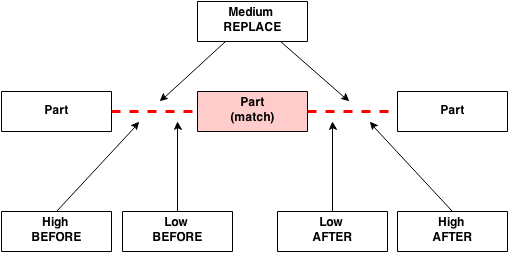
In this example, the low advice and the matched Part will not be executed, as they have been replaced by the medium Advice
Type Advice
Apart from normal Advice, which changes the execution flow, it is also possible to modify the Molecule
and Part types using type advice. For example, one Aspect could add sequence information to a whole range
of Parts; another could add modelling rules to Parts based on features selected by a PartSignature.
Analogously to addAdvice(), type advice can be added with
Adding type advice to Parts
Analogously to adding new Advice with addAdvice(), Type Advice can be
added via addTypeAdvice():
def mainAspect(self):
    self.addTypeAdvice(PartSignature('*.*'),True,"isPart")
addTypeAdvice requires three parameters: A PartSignature to select the Part, an
attribute to add to the Part type, and a name under which this Part should appear.
If the attribute is a method, it is given two parameters: self, referring to the
Aspect, and part, referring to the Part object:
class AnAspect(Aspect):
    def mainAspect(self):
        self.addTypeAdvice(PartSignature('*.*'),self.typeAdviceMethod,"sayHello")

    def typeAdviceMethod(self,part)
        print "Hello from "+str(part)
Type Advice can also be added to Molecules using the same addTypeAdvice() method.
This requires changing the first parameter to a MoleculeSignature:
def mainAspect(self):
    self.addTypeAdvice(MoleculeSignature('TranscriptionFactor+'),True,"isTranscriptionFactor")
The MoleculeSignature is simply the element of the PartSignature within the parantheses.
Type Advice Example
Here is a simple example to add a method to Promoter types to print if they are regulated or not.
from synbioweaver import *


class TwoPromoters(Circuit):
    def mainCircuit(self):
        self.addPart(Promoter)
        self.createMolecule(Protein)
        self.addPart(NegativePromoter(Protein))

class PromoterTypeAdvice(Aspect):
    def mainAspect(self):
        # define three signatures
        nonRegulatedPromoterSignature = PartSignature('*.Promoter+()')
        regulatedPromoterSignature = PartSignature('*.Promoter+(Molecule+)')
        anyPromoterSignature = PartSignature('*.Promoter+')

        # add Boolean Attribute "isRegulated" to two different types of Promoters
        self.addTypeAdvice(nonRegulatedPromoterSignature,False,"isRegulated")
        self.addTypeAdvice(regulatedPromoterSignature,True,"isRegulated")
        self.addTypeAdvice(MoleculeSignature('*.*'),4,"valueNumber")
        self.addTypeAdvice(MoleculeSignature('*.*'),self.printNumber,"printValue")

        # add a type advice method
        self.addTypeAdvice(anyPromoterSignature,self.printIsRegulated,"printIsRegulated")

    def printNumber(self,mol):
        print "molecule value is "+str(mol.valueNumber)

    def printIsRegulated(self,part):
        if part.isRegulated == False:
            print str(part)+" is not regulated by a Molecule."
        else:
            print str(part)+" is regulated by a Molecule."

compiledDesign = Weaver(TwoPromoters,PromoterTypeAdvice).output()
for part in compiledDesign.partList:
    part.printIsRegulated()

for molecule in compiledDesign.moleculeList:
    molecule.printValue()
The output will be:
Promoter is not regulated by a Molecule.
NegativePromoter(regulatedBy = Protein) is regulated by a Molecule.
Weaver Output Advice
The last item to cover is the WeaverOutput class, a
container object holding the results of the Weaver compilation and returned by Weaver.output():
compiledDesign = Weaver(ACircuit,AnAspect,AnotherAspect).output()
By default, WeaverOutput has two attributes. partList, holding the list of the parts in order of execution,
and moleculeList a list of all types of Molecules used in the system. The class also overloads __str__ to provide
a nice string output of the compiles design, which we have used in previous examples.
An Aspect can also declare output advice to the WeaverOutput. For example, this allows an Aspect implementing a rule-based modelling
concern to define additional WeaverOutput methods, such as printModel().
The mechanism is very similar to Type Advice:
def mainAspect(self):
    addWeaverOutput(self.newOutputMethod)

def newOutputMethod(self,weaverOutput):
    pass
addWeaverOutput() has only one parameter which must refer to a method of the Aspect. This weaver output advice method must accept
two parameters, self to refer to the Aspect, and weaverOutput to refer to the WeaverOutput object. Unlike
addTypeAdvice(), addWeaverOutput requires no name for the new attribute. Instead, the new method for WeaverOutput will
automatically have the same name.
Example: Print number of parts
from synbioweaver.core import *
from synbioweaver.aspects.designRulesAspect import DesignRules

declareNewMolecule('GFP')

class CodingGFP(Circuit):
    def mainCircuit(self):
        self.addPart(Promoter)
        self.addPart(CodingRegion(GFP))

class DesignRules(Aspect):
    def mainAspect(self):
        anyCodingRegion = PartSignature('*.CodingRegion+')

        beforeCodingRegion = PointCut(anyCodingRegion,PointCut.BEFORE)
        afterCodingRegion = PointCut(anyCodingRegion,PointCut.AFTER)

        self.addTypeAdvice(PartSignature('*.Terminator'),self.terminatorRuleString,'terminatorRuleString')

        self.addAdvice(beforeCodingRegion,self.insertRBS)
        self.addAdvice(afterCodingRegion,self.insertTerminator)

    def terminatorRuleString(self,part):
        print 'hello\n'
        for before in part.before:
            print before

    def insertRBS(self,context):
        self.addPart(RBS)

    def insertTerminator(self,context):
        self.addPart(Terminator)

class NumberOfPartsAspect(Aspect):
    def mainAspect(self):
        self.addWeaverOutput(self.printNumberOfParts)

    def printNumberOfParts(self,weaverOutput):
        print "The design has "+str(len(weaverOutput.partList))+" parts."

compiledDesign = Weaver(CodingGFP,DesignRules,NumberOfPartsAspect).output()
compiledDesign.printNumberOfParts()